Understanding Your Nissan Anti-Theft System: The Key Symbol and What It Means
If you drive a Nissan and have noticed a small key symbol appear on your dashboard, you are not alone. That icon is directly tied to your vehicle's Nissan anti-theft system, and it can signal anything from a routine security check to a fault that needs attention. Many drivers see this dashboard warning light and wonder if their car is about to be immobilised or if something more serious is wrong. The truth is that the key symbol is part of a layered security system designed to protect your car from theft, but it can also be a helpful indicator when something is off with the system's components.
Nissan vehicles use an advanced security system that relies on communication between the key fob and the car's onboard computer. When you see the key symbol, it often means the car is not recognising the transponder chip inside your key fob, or there is a communication error between the fob and the immobiliser. This can be frustrating, especially if you are in a hurry, but understanding how the system works will help you troubleshoot the issue quickly.
The Role of the Immobiliser and the Key Symbol
The immobiliser is a core part of the Nissan anti-theft system. It prevents the engine from starting unless it receives the correct signal from the key fob. When you insert the fob into the slot or bring it near the push-button start, the car's antenna reads the unique code from the transponder chip. If the code matches what is stored in the vehicle's memory, the immobiliser disengages and allows the engine to start. If there is a mismatch or no signal, the car stays locked, and the key symbol appears on the dashboard warning light cluster.
In many Nissan models, the key symbol looks like a small car with a key inside it, or simply a key icon. This is not a fault by itself, but rather a status indicator. It should turn off once the system verifies the key. If it stays on or flashes, you are dealing with a problem that needs investigation.
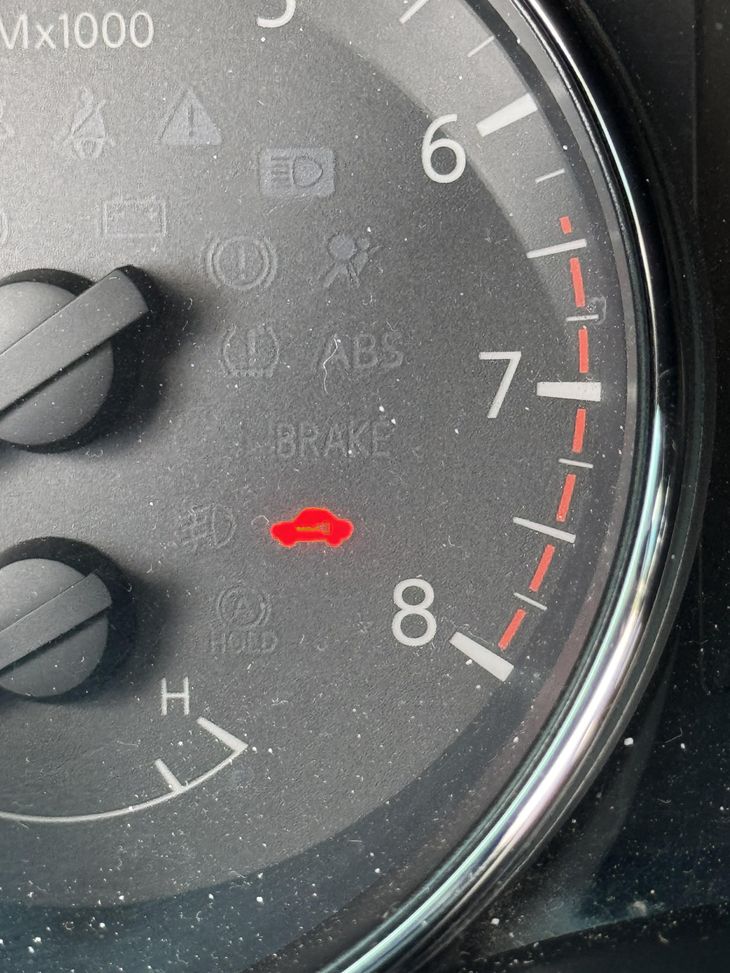
Common Reasons for the Key Symbol to Stay On
One of the most frequent causes of a persistent key symbol is a weak or dead fob battery. The transponder chip inside the fob needs power to send its signal. When the battery is low, the signal may not reach the car's receiver, or it might be too weak to be recognised. Replacing the fob battery is often the first step in troubleshooting. It is a simple fix that many drivers can do themselves by carefully opening the fob and inserting a new battery of the correct type.
Another common issue is a problem with the Nissan Intelligent Key system itself. This system uses a two-way communication between the fob and the car. If the fob has been dropped, exposed to water, or suffered a circuit failure, it may stop working entirely. In such cases, the car will not recognise the key, and the key symbol will remain lit. You might also encounter this if you have accidentally grabbed the wrong fob or if the fob has been reprogrammed incorrectly.
Sometimes the issue is not with the fob but with the car's antenna or receiver. The antenna is usually located near the ignition or the key slot. Dirt, debris, or a loose connection can interfere with the signal. Similarly, the lock cylinder or the push-button start mechanism might have wear that prevents proper contact. If you have recently had work done on the steering column or ignition area, it is worth checking that everything was reassembled correctly.
When the Security System Activates the Siren
In some situations, a malfunctioning Nissan anti-theft system can cause the siren to sound unexpectedly. This can happen if the tamper switch inside the door or the ignition is triggered by a low battery or a faulty connection. The tamper switch is designed to detect unauthorised entry attempts, but it can become oversensitive if the system is not calibrated properly. If you hear the siren when you are simply trying to start the car, it is a strong sign that the immobiliser is not disengaging correctly.
If the siren goes off, you may need to perform a reset procedure. This typically involves turning the key to the on position, waiting for a specific interval, and then turning it off again. The exact steps vary by model, so consulting the owner's manual is essential. In many cases, you can also use the keyless entry function to unlock the car, which sometimes resets the system. If none of these steps work, the next option is to contact a Nissan service centre for diagnosis.
Dealing with a Locked Out Situation
Being locked out of your own car because of the anti-theft system is a frustrating experience. If the key symbol is flashing and the car does not respond to the fob, try using the physical key in the lock cylinder. Some Nissan models still include a hidden key slot even with keyless entry. If you do not have a physical key, or if the lock cylinder is not present, you may need to use the override code that came with the car. This code is often printed on a card inside the owner's manual.

If you have lost the override code or the fob is completely dead, the vehicle identification number (VIN) can help a Nissan service centre generate a replacement key. The VIN is tied to the security system, and the service centre can program a new fob to match the car's memory. This is a more involved process, but it is sometimes the only way to regain access without damaging the vehicle.
Preventative Maintenance and Best Practices
To avoid being caught off guard by a dashboard warning light, there are a few simple habits you can adopt. Check the fob battery at least once a year, or sooner if you notice the range of the keyless entry decreasing. Keep a spare fob battery in the glove box, along with the override code card. If your Nissan uses a push-button start, be gentle with the button and the surrounding trim. Rough handling can damage the tamper switch or the antenna connection.
Another good practice is to store the fob away from other electronic devices that might cause interference. Although rare, strong radio signals from other transmitters can sometimes confuse the transponder chip. Also, avoid exposing the fob to extreme heat or moisture, as these can damage the internal circuitry.
What to Do When the Key Symbol Won't Go Away
If you have replaced the fob battery, checked the antenna, and performed the reset procedure but the key symbol still stays on, there may be a deeper issue with the security system. At this point, it is wise to visit a Nissan service centre. They have diagnostic tools that can read the error codes from the immobiliser and the ignition interlock system. They can also test the transponder chip and the car's receiver more thoroughly than a typical driver can at home.
Sometimes the problem is a software fault that requires a system update. Nissan periodically releases firmware updates for the intelligent key system, and a service centre can apply those updates. In rare cases, the control module itself may need replacement. This is not something to attempt without professional help, as it involves programming the new module to match the car's VIN and existing keys.

Finally, keep in mind that the Nissan anti-theft system is designed to be a deterrent. It is meant to make the car difficult to start without the correct key. While the key symbol can be alarming, it is usually a sign that the system is doing its job. With a little knowledge and the right steps, most issues can be resolved without major expense or inconvenience. Understanding how the immobiliser, transponder chip, and keyless entry work together gives you the confidence to handle the problem when it arises.
Remember that the owner's manual is your best friend for model-specific details. It contains the exact reset procedures, the location of the tamper switch, and the steps for replacing the fob battery. If you do not have a physical copy, many manufacturers offer PDF versions online. A few minutes of reading can save you an hour of frustration later.